
// Insights
Lighthouse’s New “Agentic Browsing” Score: What It Is, How It’s Calculated, and How to Pass It
By Keshav Sharma · Published June 18, 2026
Last updated: 18 June 2026 · A practical, research-backed guide for developers, technical SEOs, and site owners.
If you have run a Google PageSpeed Insights or Lighthouse report in the last few weeks, you may have noticed an unfamiliar section sitting quietly beneath Performance, Accessibility, Best Practices, and SEO. It is called Agentic Browsing, and instead of the usual 0–100 dial it shows something like a plain 3/3 with a couple of “Not applicable” audits hidden away.
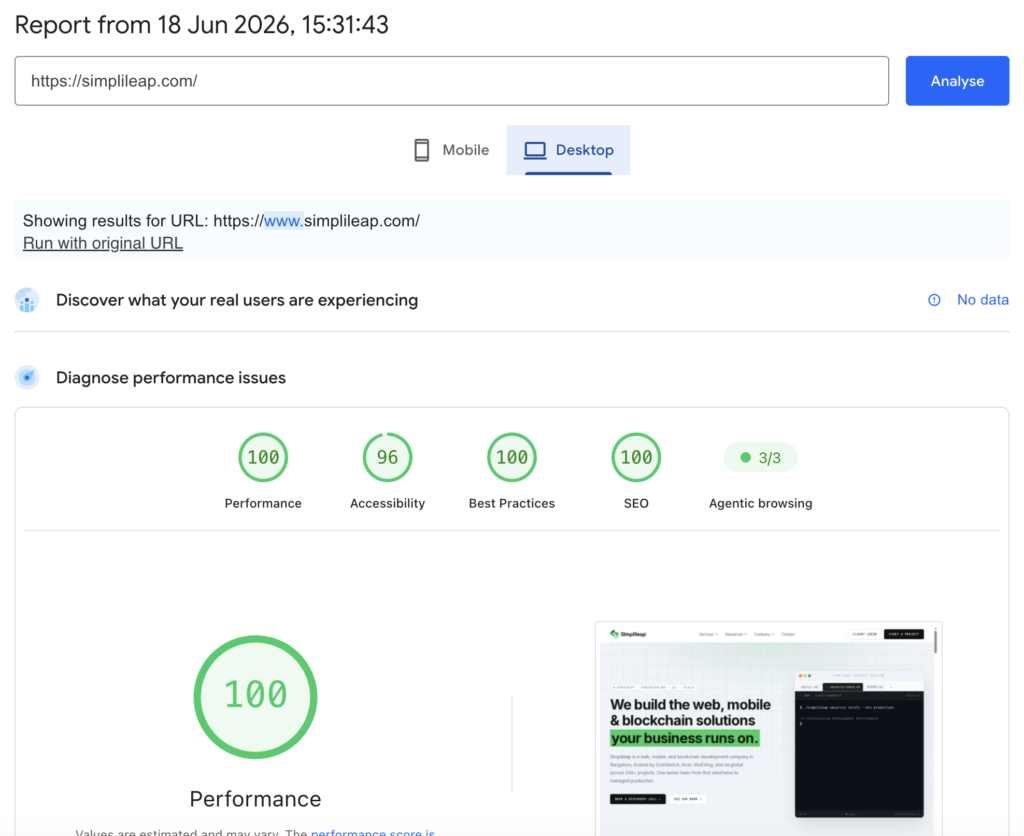
This is not a glitch, and it is not optional anymore. It is the first formal attempt by Google to measure something the web has never been scored on before: how usable your website is for an AI agent, not a human.
This guide breaks down exactly what the category is, why it appeared, how the score is calculated, and — most importantly — the concrete steps that move the needle. Everything here is anchored to Google’s official Chrome documentation and the Lighthouse source releases, with independent corroboration where it adds clarity.
TL;DR (for the impatient)
- What it is: A new, experimental Lighthouse category that audits how well your site is built for AI agents to read, understand, and act on.
- When it landed: Lighthouse 13.3.0 (released May 7, 2026) moved it into the default config. PageSpeed Insights inherits new Lighthouse releases within roughly two weeks, and it ships in Chrome 150 DevTools.
- How it’s scored: Not a 0–100 number. It shows a fractional pass ratio (e.g., 3/3) plus pass/fail/not-applicable per audit.
- What it checks: WebMCP integration, an agent-friendly accessibility tree, layout stability (CLS), and the presence of a valid
llms.txtfile. - The good news: You will not fail just because you have not adopted AI features. A plain, well-built site can already pass the applicable checks — which is exactly what your 3/3 reflects.
What is “Agentic Browsing,” and why did Google add it?
For most of the web’s history, the only machines reading your pages were search crawlers. They indexed text and followed links, and the entire SEO industry grew up around making that process smooth.
That model is now changing. AI agents — assistants and automation that can navigate a site, fill in forms, and complete tasks on a user’s behalf — interact with the web very differently from a crawler. Today, most agents “see” a page the way a tourist reads a menu in an unfamiliar language: they take a screenshot or parse the raw DOM, guess what each button does, and hope the layout does not shift mid-click. It is slow, brittle, and error-prone.
Google’s premise with the Agentic Browsing category is simple. As Chrome’s own documentation puts it, the category “evaluates how well your site is constructed for machine interaction through a set of deterministic audits.” In plain terms: it scores whether an agent can reliably figure out what your page offers and act on it without guessing.
This sits alongside a broader industry shift sometimes called GEO (Generative Engine Optimization) or AEO (Answer/Agent Engine Optimization) — the idea that being discoverable and usable by AI systems is becoming as important as ranking in classic search. When Lighthouse adds a category, the rest of the web-quality industry historically follows within roughly 18 months; that is what happened with Core Web Vitals and with Accessibility. Agentic Browsing is at the very start of that same curve.
The timeline: how this rolled out
A quick, verifiable history matters here, because there is a lot of confusion online about which Chrome version “has” it:
- February 2026 — Chrome shipped an early preview of WebMCP (the underlying agent-interaction API) behind a flag in Chrome 146, co-authored by engineers at Google and Microsoft through the W3C Web Machine Learning Community Group.
- Chrome 130–149 — The Agentic Browsing category existed but stayed hidden behind an experimental “Categories” toggle in the DevTools Lighthouse panel.
- May 7, 2026 — Lighthouse 13.3.0 moved the category into the default configuration. This is the inflection point. According to the Lighthouse release notes, the team expected it to ship in Chrome 150 DevTools and reach PageSpeed Insights within about two weeks.
- Late May 2026 onward — PageSpeed Insights runs began returning the Agentic Browsing audits automatically, regardless of which Chrome version the visitor is running.
The category is still officially labelled experimental and “under development,” and the standards it leans on (especially WebMCP) are proposed, not finalised. Expect details to change.
A note on accuracy: some third-party sites claim the category contains “nine audits” (with names like
agents.jsonandagent-runbook). Those names do not appear in Google’s official Chrome documentation and largely reflect those vendors’ own commercial “kits.” The official audit set is described below.
What does the Agentic Browsing category actually check?
Google’s documentation groups the audits into four conceptual areas, implemented as six individual audits. This maps neatly onto what you likely saw in your own report — three passed audits plus three marked “Not applicable” (the WebMCP checks, which only apply once you adopt WebMCP).
1. WebMCP integration (3 audits)
This is the genuinely new part. WebMCP (Web Model Context Protocol) is a browser-native API that lets a website declare its capabilities as structured “tools” an agent can call directly — instead of the agent reverse-engineering your interface. Think of it as giving the agent a clean, client-side API: “Here is a search_flights tool, here are the parameters it needs, here is what it returns.”
Lighthouse uses the Chrome DevTools Protocol’s WebMCP domain to monitor tool-registration events, and verifies both:
- Declarative tools — defined directly in HTML by annotating standard
<form>elements. - Imperative tools — defined in JavaScript via
navigator.modelContext.registerTool().
The three sub-audits surface which tools are registered on the page, flag forms that could be exposed as declarative WebMCP tools but are not, and validate that your WebMCP JSON schema is well-formed. Note that the WebMCP audits require Chrome 150+ and registration for the WebMCP origin trial — which is why they show as “Not applicable” for most sites today.
2. Agent-centric accessibility (the a11y tree)
Agents rely on the accessibility tree — a simplified, structured representation of your page — as their primary data model. An AI can process this far more efficiently than raw HTML or a screenshot. Lighthouse filters a specific subset of its existing accessibility audits that matter most for machine interaction:
- Names and labels — every interactive element has a programmatic name.
- Tree integrity — roles and parent/child relationships are valid.
- Visibility — content that is interactive is not hidden from the accessibility tree.
The practical takeaway: if you already invest in accessible, semantic markup, you have a head start. This audit largely reuses accessibility work you may have done for human users with assistive technology.
3. Layout stability (CLS)
This audit reports your Cumulative Layout Shift score inside the agentic context. CLS has measured visual stability for human users since 2020, but it matters even more for agents. An agent may identify an element’s position, then attempt to click it a moment later — if an ad, an un-sized image, or injected content has shifted the layout in between, the interaction can fail. Agents also act faster than humans, so load-time shifts that a person would barely notice can derail an automated flow.
4. Discoverability via llms.txt
Lighthouse checks for an llms.txt file at your domain root — a proposed, machine-readable Markdown summary of your site for AI tools. If the file exists, the audit validates basic quality signals: it flags the file if it is missing an H1 heading, is too short, or contains no links. Worth being honest here: llms.txt is a proposed convention and is not yet widely consumed by major AI tools, so treat it as low-cost hygiene rather than a guaranteed traffic driver.
How is the score calculated? (And why there’s no “87/100”)
This is the part that surprises people most. Unlike every other Lighthouse category, Agentic Browsing does not produce a weighted 0–100 score.
Google’s reasoning, straight from the docs: because the standards for the agentic web are still emerging, the current goal is to gather data and provide actionable signals rather than a definitive ranking. A single number like “87” would imply a false precision that the underlying standards simply cannot support yet.
Instead, the report shows:
- A fractional score — a ratio of how many agentic-readiness checks your site passes (your 3/3).
- Pass / Fail status — individual audits may emit errors or warnings if technical requirements (such as WebMCP schema validity) are not met.
- Informational counts — a pass ratio in the category header so you can track progress at a glance.
The audits are deterministic, which is deliberate: it makes the results reproducible and safe to wire into CI/CD pipelines. You can even run just this category from the command line:
npx lighthouse@latest https://yoursite.com --only-categories=agentic-browsing
That returns per-audit JSON your build pipeline can gate against.
Why your results can still fluctuate
“Deterministic” does not mean “frozen.” Google lists three common reasons the same site can score differently between runs:
- Dynamic tool registration — if you register WebMCP tools with JavaScript, the timing of registration can affect whether Lighthouse captures them in its snapshot.
- Accessibility-tree variability — significant changes in DOM size or complexity can reshape the a11y tree.
- CLS — layout shifts from ads, un-sized images, or injected content move the numbers around.
Why this matters for your site (the business case)
It is tempting to dismiss an “experimental” category. Two reasons not to:
First, visibility just went from opt-in to universal. Before 13.3.0, only developers who deliberately enabled the category ever saw these audits. Now every PageSpeed Insights run, every web.dev/measure check, and every SEO-audit tool that wraps Lighthouse surfaces them — to your team, your prospects, your partners, and your competitors. The audit was always there; the visibility is what shipped.
Second, the commercial logic of the agentic web is real. If users increasingly delegate tasks — “book me the cheapest flight to Delhi next Monday” — then the sites with clear, reliable agent interfaces will be the ones agents can actually transact with. Sites that an agent cannot parse simply will not appear in its decision space. The same existential pressure that built the SEO industry is forming again, one layer up the stack.
That said, keep perspective: Google positions this as a readiness signal, not a search-ranking lever. Do not treat your pass ratio as a confirmed ranking factor without independent guidance from Google Search itself.
Best practices: how to improve your agentic readiness
Here is the actionable part, ordered roughly by effort-to-impact. Notably, two of the four areas (accessibility and CLS) are things many teams have already worked on — so the head start is real.
1. Get the fundamentals right (highest ROI, lowest risk)
Before touching anything AI-specific, fix the basics that already give most sites their passing 3/3:
- Use semantic HTML and proper ARIA labelling. Every interactive element needs a programmatic name. This is the “machine-eye view” of your page and it helps humans on assistive tech at the same time.
- Eliminate layout shift. Set explicit
width/height(oraspect-ratio) on images and media, reserve space for ads and embeds, and avoid injecting content above existing elements after load. Lighthouse’s standard Performance audit will pinpoint the offenders. - Keep your DOM clean and reasonably sized. A bloated, deeply nested DOM produces a noisier accessibility tree.
None of this conflicts with your existing performance or accessibility goals — it reinforces them.
2. Add a quality llms.txt file
A small, cheap win. Place an llms.txt Markdown file at your domain root. To pass the quality checks, make sure it:
- Starts with a clear
H1title (your site/brand name). - Is substantive — not a near-empty stub.
- Contains links to your key pages and documentation.
A simple skeleton:
# Your Company Name

> One-sentence summary of what your site does.

## Key pages
- [Products](https://example.com/products): What you offer
- [Docs](https://example.com/docs): Developer documentation
- [Contact](https://example.com/contact): How to reach support
Set expectations internally: this is hygiene, not a magic switch, since major AI tools do not yet broadly consume the file.
3. Adopt WebMCP where it genuinely fits
This is the highest-effort, highest-upside area — and the one that moves you from “passes the applicable checks” to “actively agent-ready.” Two paths:
Declarative API (start here). If you already have well-built forms, you can expose them to agents with a few HTML attributes — toolname, tooldescription, and optional toolparamdescription on fields. The browser reads the form’s structure and generates a JSON schema automatically:
<form toolname="book_table"
      tooldescription="Book a restaurant table for a date, time, and party size">
  <input name="date" type="date" toolparamdescription="Reservation date">
  <input name="guests" type="number" min="1" max="12"
         toolparamdescription="Number of guests">
  <button type="submit">Book</button>
</form>
By default the user still clicks submit when an agent fills the form, which keeps a human in the loop for write actions.
Imperative API (for complex, stateful flows). For multi-step workflows or dynamic logic, register tools in JavaScript. Always guard the call, since the API only exists in supporting browsers:
if ('modelContext' in navigator) {
  navigator.modelContext.registerTool({
    name: 'search_flights',
    description: 'Search available flights by route and date',
    inputSchema: {
      type: 'object',
      properties: {
        origin:      { type: 'string', description: 'Departure airport code' },
        destination: { type: 'string', description: 'Arrival airport code' },
        date:        { type: 'string', description: 'Travel date (YYYY-MM-DD)' }
      },
      required: ['origin', 'destination', 'date']
    },
    execute: async (params) => {
      const results = await searchFlightsAPI(params);
      return { content: [{ type: 'text', text: JSON.stringify(results) }] };
    }
  });
}
WebMCP best practices that matter:
- Tool descriptions are the new meta descriptions. The quality of each tool’s name, description, and schema directly determines whether an agent selects and uses it correctly. Use clear verbs and explain the why behind options.
- Separate read from write. Read-only operations (search, filter) can auto-submit; anything that mutates state, spends money, or sends data should require explicit user confirmation.
- Treat agent input as untrusted. The MCP ecosystem has already seen prompt-injection and tool-poisoning attacks. Validate every parameter the way you would for any public API endpoint, and never expose admin actions without a confirmation step.
- Test with the right tools. Install the Model Context Tool Inspector Chrome extension to see which tools are registered, call them manually, and verify your schema parses as expected.
A serious caveat: WebMCP is still a DevTrial / origin-trial-stage API. The surface will change. Build prototypes and learn the patterns now, but do not ship mission-critical functionality on top of an unstable spec.
4. Re-test and monitor
After any change, re-run Lighthouse — ideally a few days later, since both PageSpeed Insights and DevTools cache audits. Wire the CLI command above into CI so a regression (a new layout shift, a broken schema) is caught automatically rather than discovered in a customer’s audit.
What not to do
- Don’t panic-buy an “agentic readiness kit.” Several vendors are marketing paid packages around audit names that are not part of the official spec. Verify any audit name against Google’s Chrome documentation first.
- Don’t treat the pass ratio as an SEO ranking factor. It is a readiness signal. There is no confirmed link to Search rankings today.
- Don’t ship WebMCP write-actions without human confirmation. The convenience is not worth the security and trust risk while the spec and its security model are still maturing.
- Don’t over-index on
llms.txt. Add it, keep it clean, then move on to higher-impact work.
Key takeaways
The Agentic Browsing category is Google formalising a long-standing argument from the accessibility and performance communities: clean, well-structured, stable markup is infrastructure, not a nice-to-have. What is new is that it is now being scored explicitly through the lens of machine usability.
For most sites, a passing 3/3 today simply means your accessibility tree, layout stability, and llms.txt are in order — and the three “Not applicable” results are the WebMCP audits waiting for you to opt in. That is a healthy baseline. The real opportunity is in the next step: thoughtfully exposing your core flows to agents via WebMCP before it becomes table stakes, the same way early Core Web Vitals adopters got ahead of that curve.
Start with the fundamentals, add a tidy llms.txt, prototype WebMCP on one or two of your highest-value forms, and re-test on a schedule. That sequence costs little, helps your human users too, and positions you for a web where agents are an increasingly common kind of visitor.

Author
Keshav Sharma
Co-Founder, Engineering and Lead Architect
Keshav brings over 10 years of experience in software engineering, full-stack development, blockchain technologies, and cloud-native solutions. With expertise spanning Next.js, Node.js, Smart Contracts, and Secure digital asset platforms, he has successfully delivered scalable products across industries.
LinkedIn profile →Ready to scope your next initiative?
Share your goals with our Bangalore team. We respond within one business day with a clear path from discovery to delivery.